[ field note ] · 13 Jul 2026
Migrate PostgreSQL to CloudNativePG with CNPG Migrator
A Kubernetes-native, declarative workflow for bringing PostgreSQL into CloudNativePG from AWS RDS or any PostgreSQL running outside your cluster.
- postgresql
- rds
- cloudnativepg
- kubernetes
- migration
- helm
- open-source
If your apps run on Kubernetes, you probably want the database lifecycle to look like everything else in the cluster: declarative manifests, GitOps, observable Jobs, and resources you can tune without a separate control plane.
Two common starting points lead to the same destination: bring your PostgreSQL to Kubernetes.
- AWS RDS: your apps run on Kubernetes, but the database still lives outside the cluster.
- PostgreSQL outside Kubernetes: a managed service, a VM, or any Postgres host that is not yet running under the CNPG operator.
Physical import or dump and restore?
CNPG can bootstrap a new cluster from an external source using externalClusters and bootstrap.initdb.import. That works well when the source is a self-managed PostgreSQL you control (for example Postgres on a VM or an in-cluster Helm chart) and you can give CNPG the connection details and privileges it needs.
RDS is the common exception. It does not expose the privileges required for physical replication, so externalClusters bootstrap is not a practical path. For RDS, and for any source where you want a repeatable Job-based workflow with explicit control over ownership, roles, and extensions, the practical path is:
pg_dump->pg_restore
That sounds simple until you do it: version-matched client images, parallel restore, progress visibility, failure recovery, and the usual ownership and grants surprises.
We built CNPG Migrator, an open-source web UI and Go API that orchestrates dump and restore migrations inside Kubernetes.
It’s logical migration, not zero downtime. What you get is a repeatable workflow on CNPG, where databases, roles, extensions, and backup policies are declared in code and easier to rightsize after cutover. We’ve run it on 20+ migrations from RDS and external PostgreSQL into CNPG.
In our environment (same-region network between the cluster and RDS, custom format dump, default parallelism in the UI), a ~10 GB database usually completes dump and restore in around 2 minutes. Network latency, source I/O, PVC storage class, and parallel job settings will change that number for you.
Who this is for
RDS on AWS, apps on Kubernetes. Your data plane is still managed outside the cluster: instance classes, snapshots, parameter groups, backup schedules, often expressed as Terraform or CloudFormation. CNPG moves it back in. If you fall behind on engine support, you can also end up on RDS extended support and paying for emergency upgrades.
PostgreSQL running outside Kubernetes. Whether it’s RDS, a cloud-managed instance, or Postgres on a VM, CNPG Migrator works the same way: point it at the source host, credentials, and port, and restore into a CNPG cluster inside your Kubernetes cluster.
The question in both cases is: how do you move the data reliably without reinventing the runbook every time?
Why CNPG is worth betting on
Picking a database platform inside a company is a longevity call. You need something you can defend in an architecture review and operate for years.
CloudNativePG is a CNCF incubating project that covers the basics well:
- HA and failover: the operator manages primary/replica topology and automated failover
- Backup and restore: scheduled backups to object storage, with restore into new clusters built in
- Declarative setup: databases, roles, extensions, and cluster configuration in a single Cluster CRD
Public health and activity metrics are on the Linux Foundation Insights dashboard. CNPG Migrator helps you get onto CNPG without a one-off migration script.
CNPG Migrator: smooth, observable, Kubernetes-native
CNPG Migrator wraps pg_dump and pg_restore into a workflow your platform team can reuse.
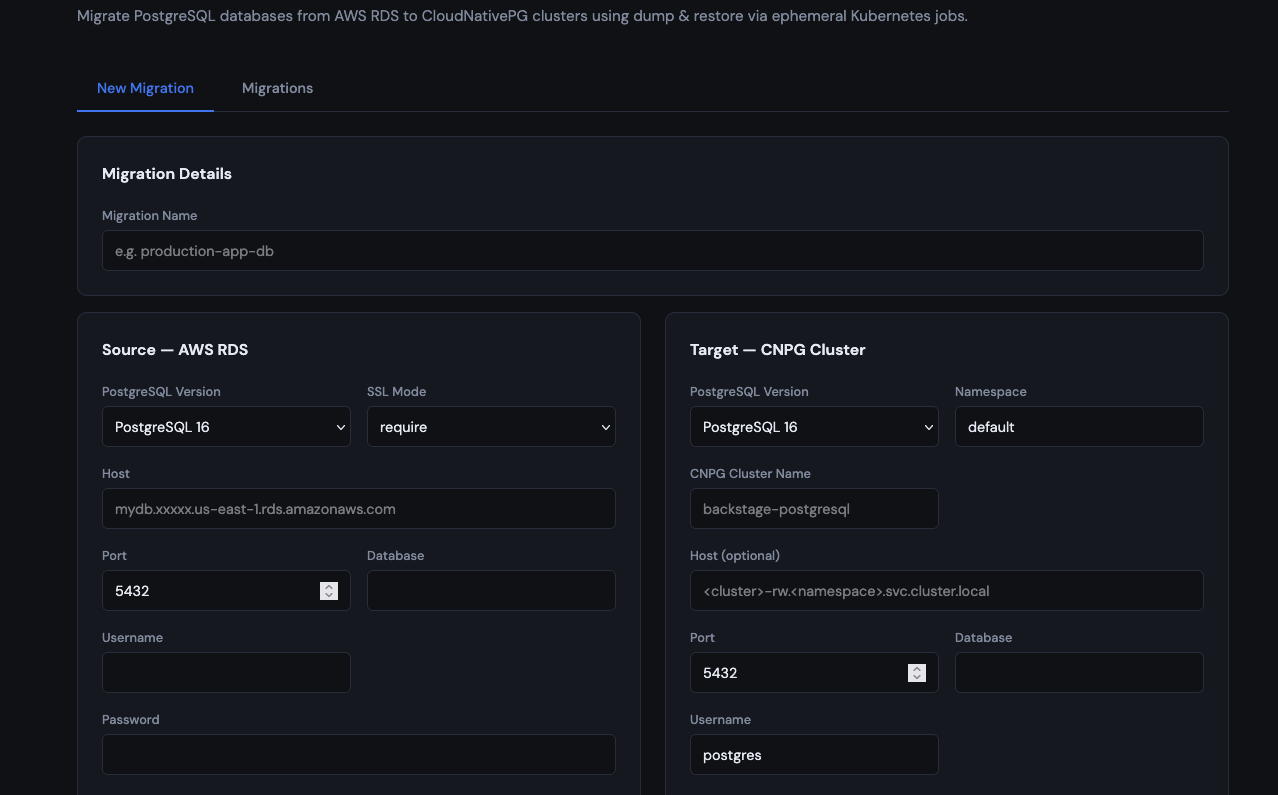
- You submit source (RDS or any external PostgreSQL) and target (CNPG) config in a UI.
- The API creates a PVC and a Kubernetes Job:
- init container:
pg_dump - main container:
pg_restore
- init container:
- The UI shows progress and pod logs.
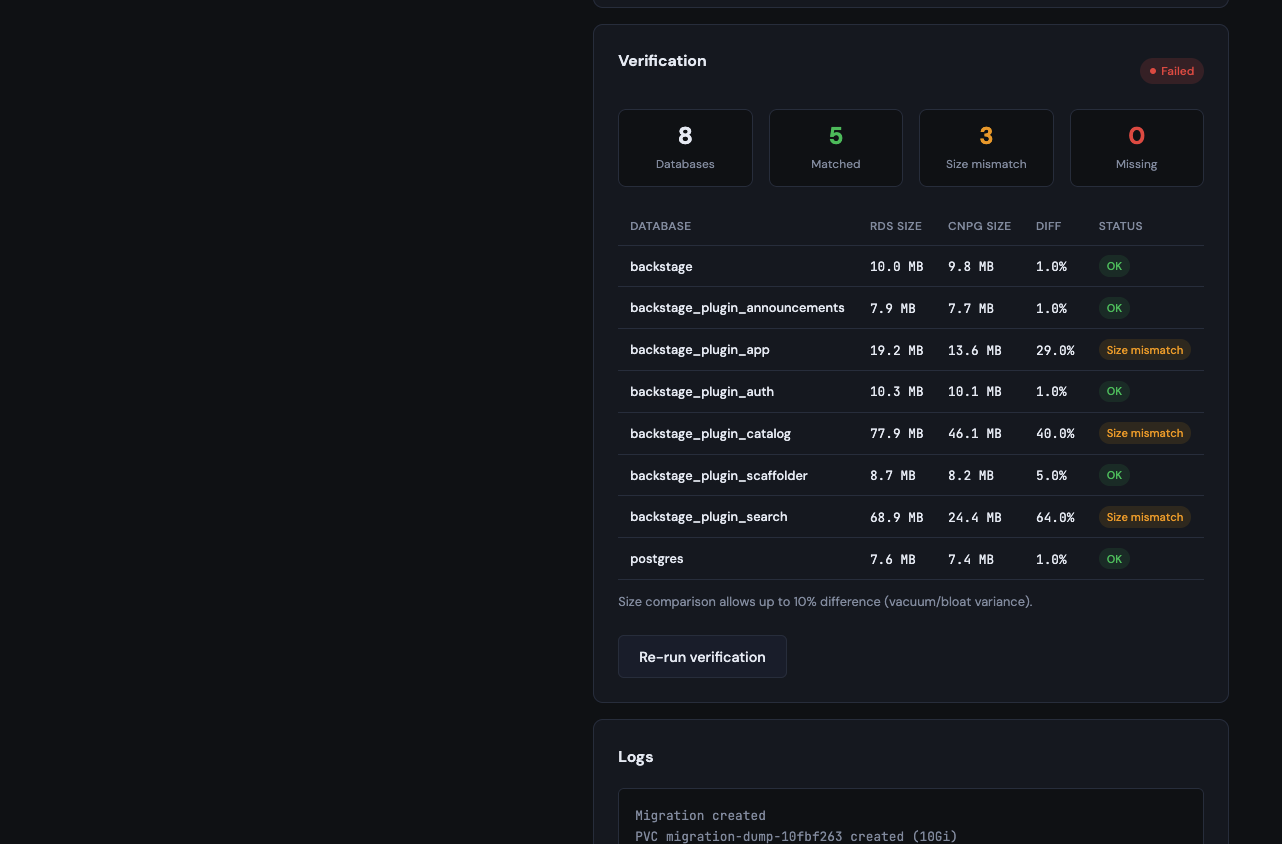
- Optional verification compares source and target database sizes.
The Job is short-lived. The dump lives in a PVC. The target cluster keeps running through CNPG.
What makes these migrations tricky?
1) Client versions must match the workload
The migrator uses version-aware postgres:<version> images so pg_dump and pg_restore align with source and target. The restore client uses the newer of the two versions. Downgrades (for example PG16 to PG15) can still fail if the dump uses newer features.
2) Ownership and grants often change
Many dumps are restored as the restore user, so objects shift ownership. By default, the migrator uses --no-owner --no-acl so restores don’t fail when roles don’t exist on the target yet.
If you need to keep object owners and grants, enable:
- Preserve ownership and grants
- Migrate roles from source
Role passwords are not copied (--no-role-passwords), and RDS system roles are excluded.
On our first migrations, we skipped roles and permissions. The restore worked, but applications couldn’t connect with the expected grants. We had to redo the migration with Preserve ownership and grants and Migrate roles from source enabled. Decide your ownership strategy before the maintenance window.
3) Extensions belong in the CNPG Cluster spec
CNPG provisions extensions via databases[].extensions. You don’t want pg_restore fighting the operator with CREATE EXTENSION again.
CNPG Migrator defaults to skipping extension objects on restore. The workflow is:
- declare extensions in the CNPG Cluster spec
- let the operator create them
- restore schema and data without re-creating extensions
The operator owns extensions. The migrator owns data. That split keeps the cutover predictable.
What you’ll see in practice
Most of the workflow happens in the UI: configure source and target, pick migration options, then follow progress through dump, restore, and verification.
After you submit a migration, the API creates a Kubernetes Job and PVC. Follow progress from the UI or the cluster:
kubectl get jobs,pvc -n cnpg-migrator
kubectl logs -n cnpg-migrator job/cnpg-migrator-<migration-id> -c pg-dump
kubectl logs -n cnpg-migrator job/cnpg-migrator-<migration-id> -c pg-restore
When verification is enabled, the UI compares database sizes. That catches gross misses (not logical corruption), but it’s enough to confirm the cutover landed:
Install and run
Prerequisites:
- A Kubernetes cluster with the CloudNativePG operator installed
- A target CNPG cluster already created (databases, roles, and extensions declared in the Cluster spec)
- Network connectivity from your Kubernetes cluster to the source PostgreSQL. Migration pods must reach the source host on port 5432 (RDS security groups, VPC routing, peering, firewall rules, or VPN as needed)
- A
StorageClassthat supportsReadWriteOncePVCs, sized for your dump
Install with Helm:
helm upgrade --install cnpg-migrator oci://ghcr.io/kaskol10/charts/cnpg-migrator \
  --version 0.1.4 \
  --namespace cnpg-migrator \
  --create-namespace
Access the UI:
kubectl port-forward -n cnpg-migrator svc/cnpg-migrator 8080:80Fill in:
- Source: RDS endpoint or any PostgreSQL host reachable from the cluster, plus port and credentials
- Target: CNPG cluster resource name and namespace
- Options: ownership, extensions, parallelism, PVC size
The restore host defaults to <cluster-name>-rw.<namespace>.svc.cluster.local, so the CNPG Cluster resource name must match what you enter in the UI.
Cutover checklist
Plan a maintenance window. This is the runbook we reuse for RDS and external PostgreSQL cutovers.
Before the window
- Provision the CNPG cluster with databases, roles, and extensions already declared in the Cluster spec.
- Confirm connectivity from the
cnpg-migratornamespace to the source PostgreSQL. Test TCP reachability on port 5432 from a debug pod before the window. - Size the dump PVC with headroom above the source database size (compressed dumps are usually smaller, but don’t cut it close).
- Run a dry run against a staging source when possible:
- RDS: restore an RDS snapshot to a temporary instance and point Migrator at that endpoint
- VM or self-managed Postgres: restore a backup to a staging host, or use a logical replica you can pause
- Use the same PostgreSQL version, extensions, and restore options as production
- Document the rollback path (keep the source available until you’ve validated the target).
During the window
- Stop application writes to the source database (scale deployments to zero, enable maintenance mode, or block at the connection pool).
- Confirm the source is quiesced: no active writes, replication caught up if applicable.
- Submit the migration in the UI (or via API) with the final options: ownership, role migration, extension skip, parallelism, PVC size.
- Watch the Job through the UI and
kubectl logsuntil dump and restore complete. - Run verification and compare database sizes. Spot-check critical tables, extensions, and grants if your app depends on them.
After restore succeeds
- Smoke-test the CNPG cluster: connect with the app user, run a few read/write queries, confirm extensions are present.
- Repoint applications to the CNPG service (
<cluster-name>-rw.<namespace>.svc.cluster.local) or update Secrets/ConfigMaps your chart reads. - Bring workloads back and watch error rates, connection counts, and query latency.
- Enable CNPG backups on the target cluster before you decommission the source.
Cleanup
Once you’re confident in the cutover, delete the migration Job and dump PVC. The UI and API expose this directly (DELETE /api/v1/migrations/{id}/resources), or you can remove the resources by name:
kubectl delete job cnpg-migrator-<migration-id> -n cnpg-migrator
kubectl delete pvc cnpg-migrator-<migration-id> -n cnpg-migrator
Dump PVCs contain a full copy of your database. Treat them as sensitive.
If restore fails
- Read the restore container logs first. Extension conflicts, missing roles, and version mismatches usually show up there.
- Don’t repoint applications. The source is still your source of truth.
- Fix the target prep (add missing roles, declare extensions in the Cluster spec, adjust restore flags) and re-run the migration Job.
- Delete the failed Job and PVC before retrying so you start from a clean dump.
Declarative operations and rightsizing after migration
The migration Job is the one-off part. What you get on the other side is the long-term win.
On RDS, rightsizing is constrained. You pick from a fixed instance menu, and changing size often means planning around downtime and cost. With CNPG on Kubernetes, you have more room to tune:
- CPU and memory: set requests and limits per instance, scale up or down through the Cluster spec
- Storage: grow PVCs and adjust storage classes without leaving the Kubernetes model
- Topology: change replica count, affinity, and node placement as workloads evolve
- Operational overhead: tune the migration Job for the cutover window, then run the CNPG cluster leaner than the old RDS footprint
A typical pattern from our RDS cutovers:
| RDS (before) | CNPG (after, week 1) | CNPG (after tuning) | |
|---|---|---|---|
| Shape | db.t4g.large (2 vCPU, 8 GiB) |
3 instances, conservative requests | Adjusted from metrics |
| CPU | Fixed instance size | 500m request / 2 limit |
250m request / 1 limit |
| Memory | Fixed instance size | 2Gi request / 4Gi limit |
1Gi request / 2Gi limit |
# excerpt from the CNPG Cluster spec after tuning
spec:
  instances: 3
  resources:
    requests:
      cpu: 250m
      memory: 1Gi
    limits:
      cpu: "1"
      memory: 2Gi
We started conservative after cutover, watched CPU/memory and query latency for a couple of weeks, then reduced requests. On RDS, dropping from db.t4g.large to a smaller instance class would have been a separate change window.
Once the data is in, everything else stays declarative:
- databases, roles, and extensions in the Cluster CRD
- backup schedules and object storage policies as operator features
Start conservative, watch metrics, and adjust the Cluster spec. That’s a normal Kubernetes loop.
Limitations
CNPG Migrator is for logical migration. Plan a maintenance window. It is not zero-downtime replication.
The UI has no built-in authentication. Self-host it behind your VPN or an auth proxy. Credentials are passed to Jobs via environment variables today; Kubernetes Secrets integration is on the roadmap. Until then, restrict namespace access, limit RBAC on Jobs and PVCs, and treat dump PVCs as sensitive data.
Get involved
Repo: CNPG Migrator
If you’re bringing RDS or external PostgreSQL into CNPG, give it a try and tell us what you think:
- What extensions did you need?
- How did you handle grants and owners?
- What would you want in a pre-flight check or verification step?
Issues and PRs welcome.